

 BC3 Loader
Digital time tracking, simple and reliable
Temvora is 44 Technologies' time-tracking software: your employees clock in from their phone, their browser or a kiosk, and you manage shifts, calendars and records, with no paper or spreadsheets.
Three ways to clock in
With the mobile app (Android), from the browser or at a shared kiosk with a personal code: everyone clocks in the way that suits them best, even offline from the phone.
All your time tracking in one place
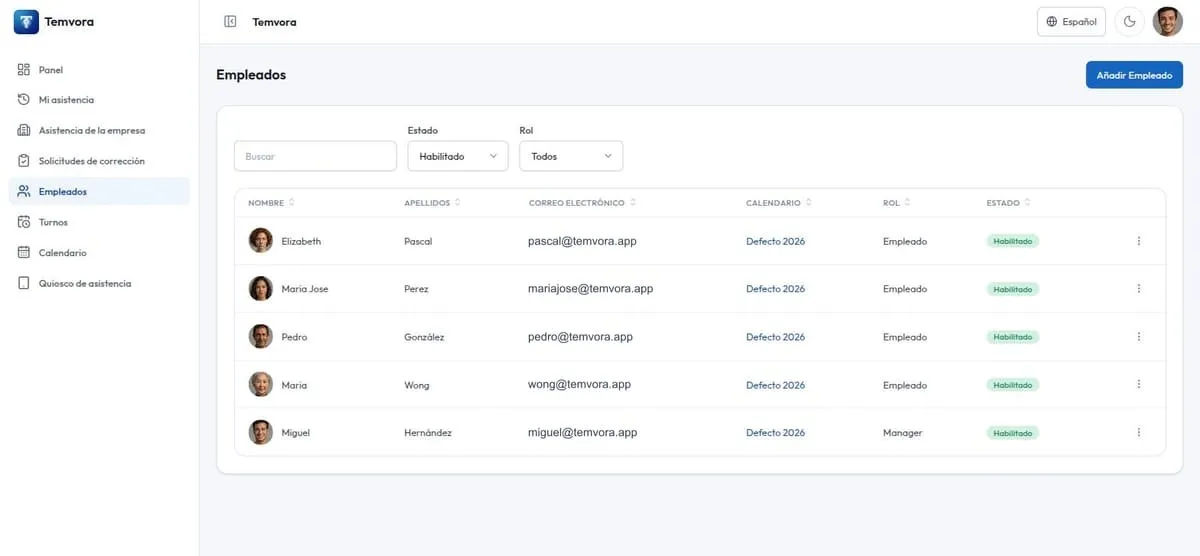
Look up the whole team's records, see who has clocked in today, define shifts and the work calendar and fix what needs fixing from the web Dashboard.
Two tools, one system
Temvora has a mobile app for employees and a web Dashboard for employees and managers. Each one does its own job.
Mobile app
For the employee: clock in from an Android phone with location, check their shift and the work calendar and review corrections. It includes no management tasks.
Web Dashboard
For employees and managers: clock in from the browser with nothing to install, and manage the company's employees, shifts, calendars and records.
How it works
Temvora is designed so that clocking in takes an employee seconds and whoever manages the team has the records in order in one place.
The employee flow
- They receive the access invitation from their company and create a personal account, or use a personal code if they clock in at a kiosk.
- They clock in and out with a tap from the mobile app, from the browser or at the company kiosk.
- If the phone has no connection the clocking is saved and synced when coverage returns; the app reminds them when it is time to clock in according to their shift.
- They check their history, today's working day and their calendar, and review the corrections the company proposes or request their own.
The manager flow
- Add people, assign their role, resend the access invitation and reset clock-in codes from the Dashboard.
- Define shifts, assign them to each person and set the company's non-working days.
- See at a glance who has clocked in today and search the records of anyone on the team.
- Review and correct records: the company and the employee propose, accept or reject changes.
Request a demo
Tell us about your team and we will show you Temvora in action. You can also explore the product on its own website.