

 BC3 Loader
 Temvora

Build Secure Software (An Implementation for Java)
Continuing the series or articles of building a secure software (see previous article), where we defined a set of standard stages where any piece of the software can be created in the company with confidence and safety.
This article will bring a sample of implementation for Java Components and Maven as a build tool and Gitlab as CI/CD.
The Project
First let’s have a testing project created by Spring Initializr:
https://github.com/albert0-hernandez/medium-ssdlc-spring-boot-secure
Take a look to the build configuration section defined in maven’s pom:
            <plugin>
                <groupId>org.openclover</groupId>
                <artifactId>clover-maven-plugin</artifactId>
                <!-- OMMITED-->
            </plugin>
            <plugin>
                <groupId>org.apache.maven.plugins</groupId>
                <artifactId>maven-pmd-plugin</artifactId>
                <!-- OMMITED-->
            </plugin>
            <plugin>
                <groupId>com.github.spotbugs</groupId>
                <artifactId>spotbugs-maven-plugin</artifactId>
                <!-- OMMITED-->
            </plugin>
            <plugin>
                <groupId>org.owasp</groupId>
                <artifactId>dependency-check-maven</artifactId>
                <!-- OMMITED -->
            </plugin>
            <plugin>
                <groupId>org.apache.maven.plugins</groupId>
                <artifactId>maven-enforcer-plugin</artifactId>
                <!-- OMMITED -->
            </plugin>
The Process
You can see several plugins included:
- PMD: a Static Application Security Testing (SAST) tool
- SpotBugs: A second Static Application Security Testing (SAST) tool
- Clover: a tool that generates Test Coverage reports
- Owasp: Software Composition Analysis tool
- Enforcer: Maven Plugin to enforce rules on build
In the same project you can also take a look to the file .gitlab-ci.yml.
include:
  - remote: 'https://raw.githubusercontent.com/albert0-hernandez/dev-utils/refs/heads/main/java/gitlab/.java-component.yml'
You expect to see there the whole pipeline definition? Come on! let’s follow the DRY principle and externalize the pipeline definition to reuse it in every single Java component we need to build in our organization.
Note: There is different ways to link the pipeline definition depending of your security restrictions. So, check the * gitlab documentation section*
The Pipeline
Now the table is set, lets run the pipeline and analyze it (Note that the Gitlab’s naming for phases are stages).
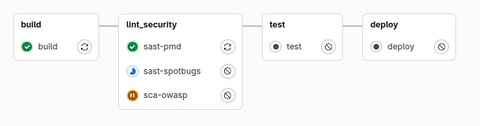
1. Build Stage
Here there is the standard phase of compiling the java code. Nothing Less but nothing more. Just Compile the source code!
2. Lint Security Stage
Once the code is compiled, in this stage is where the whole magic of SSDLC happened. We use different tools to evaluate the security.
The three tools runs in parallel to optimize the build time and to provide a better and clear feedback when a tool detect some security issues that needs to be addressed.
First with the PMD step (job) we execute an static analysis code where we find early detection of bugs, improved the code quality, help to maintain the code and ensure our code has compliance with standards and best practices. I strongly recommend a common PMD rule set for all projects in order to normalize the standard in the organization. This is whte way that it is defined in the plugin, with the ruleset defined in a differente repository.
            <plugin>
                <groupId>org.apache.maven.plugins</groupId>
                <artifactId>maven-pmd-plugin</artifactId>
                <version>${maven.plugins.pmd}</version>
                <configuration>
                    <excludeRoots>
                        <excludeRoot>target/generated-sources</excludeRoot>
                    </excludeRoots>
                    <rulesets>
                        <ruleset>https://raw.githubusercontent.com/albert0-hernandez/dev-utils/refs/heads/main/java/pmd/pmd-ruleset.xml</ruleset>
                    </rulesets>
                </configuration>
            </plugin>
You can set in the plugin definition a threshold rule where if any of the current dependencies has a vulnerability equal or greater than 8, the build will fail and break it the pipeline.
Also it is possible to set up your own values according to your security standards or even configured suppressions in case of needed.
* Note: The exposed is the very basic configuration of this plugin. In real scenarios it takes too long for each build to download y recreate the NVD database and then to apply the analysis. I promise in the nearly future to dedicate an entire post to more advanced configurations of this plugin. *
3. Test Stage
Once the software was compiled and analyzed now we can proceed the code to test the code. We reach this stage knowing that all the security analysis is completed so now we need to check that the code does what needs to do.
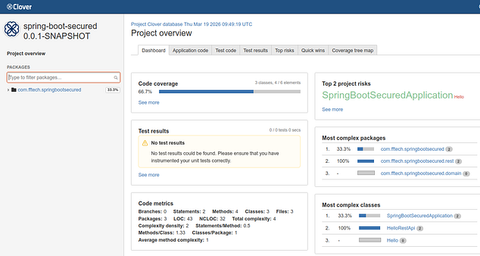
Running the Clover plugin in the testing phase, allow us in the build time to quick reports and metrics to control the project. We can also define a coverage threshold to reach to the project.
Take a look, that the team should review the artifacts collected by gitlab with the report of the coverage.
4. Deploy Stage
Finally the latest stage is the deploying to your internal repository using the standard maven plugin.
Taking a closer look to the deploy stage. Maybe you let pass a little detail here where even in maven phase we apply a quick but an important security measure. The pipeline only deploys the releases from main branch (defined branches).
deploy:
  stage: deploy
  script:
    - VERSION=$(./mvnw $MAVEN_CLI_OPTS --quiet org.apache.maven.plugins:maven-help-plugin:3.2.0:evaluate -Dexpression=project.version -DforceStdout)
    - export phase=$(if [[ "$VERSION" == *SNAPSHOT ]]; then echo deploy; else echo install; fi)
    - ./mvnw $MAVEN_CLI_OPTS clean $phase -DskipTests
  artifacts:
    name: "$CI_JOB_NAME-$CI_COMMIT_REF_SLUG"
    when: always
    expire_in: 1 day
    paths:
      - target/app.war
      - "*/target/app.war"
      - target/batch.jar
      - "*/target/batch.jar"

deploy-ga:
  stage: deploy
  only:
    refs:
      - main
  except:
    - schedules
  script: ./mvnw $MAVEN_CLI_OPTS clean deploy package -DskipTests
  artifacts:
    name: "$CI_JOB_NAME-$CI_COMMIT_REF_SLUG"
    when: always
    expire_in: 1 day
    paths:
      - target/app.war
      - "*/target/app.war"
      - target/batch.jar
      - "*/target/batch.jar"
With this, we ensure that the released components are created from the main branch where merge reviews validate that code. (Indeed other rules should be take in place too, but It’s assumed that your releases repository has certain level of maturity).
Conclusion:
This post show us that it is simple an quick create secured software components in a quick and continuous analysis without any effort to the development team. In this case the definition of done (DOD) in terms of security is completed when the pipeline succeeded. This enable to the teams and organizations to be more proactive, constant and efficient software development. In the future, we can review how this component is shipped and deployed in production nowadays and how to secure the rest of this components.